
Kotak Digital Kotaqx License Whitelist for EDD Easy Digital Downloads Software Licensing

Kotaqx License Whitelist for EDD

Enforce per-license URL whitelists for Easy Digital Downloads Software Licensing.

Select currency

Select plan

Current Version
: v1.0.2
Documentation
Changelog
Requires WordPress
6.2
Testep up to
: 6.8
Requires PHP
7.2

Kotaqx License Whitelist for EDD by Kotak Digital (Kotaqx)

Kotaqx License Whitelist for EDD extends Easy Digital Downloads Software Licensing by adding URL whitelist functionality at the license level.
It allows clients to restrict license activations to a predefined list of URLs, giving more control and flexibility in managing software deployments.

Key features:

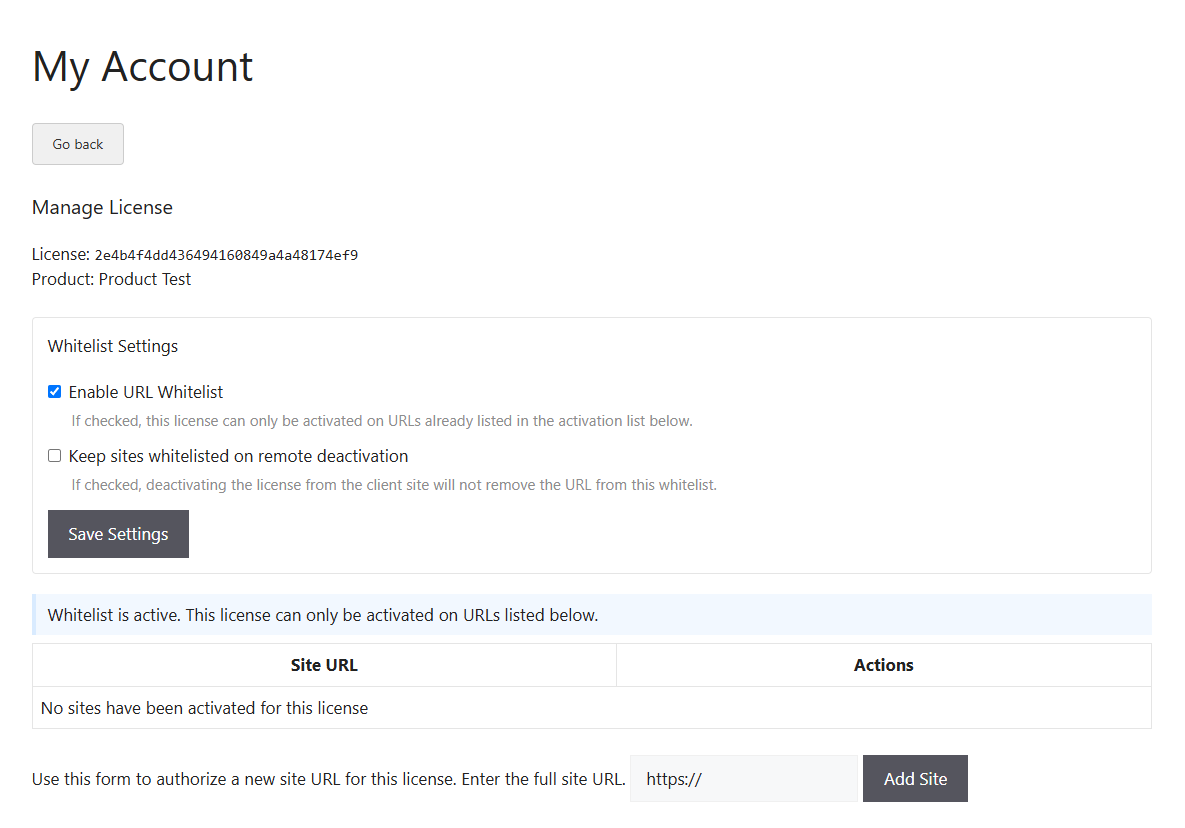
  • Enable URL Whitelist: If checked, the license can only be activated on URLs already listed in the activation list.
  • Keep sites whitelisted on remote deactivation: If checked, when a license is deactivated from a client site, the URL remains in the whitelist instead of being removed.

This ensures that only approved websites can activate and keep licenses, even after deactivation events.

Info:

  • Clients can view and manage this feature from the EDD dashboard on the front end, under: My Account > View Licenses > Manage Sites.
  • This plugin modifies the default EDD Software Licensing template licenses-manage-single.php.
    A custom version of this template is included in the plugin under the /templates/ directory.
    If you need to customize it further, you can copy the file into your theme’s edd_templates folder and adjust it according to your needs, following the standard EDD template override system.

Frequently Asked Questions

No. It requires the EDD Software Licensing extension to function.

Clients can manage this feature in the front end, under: My Account > View Licenses > Manage Sites.

Yes. The whitelist is an optional per-license setting. Clients can enable or disable it as needed.

Not at the moment.
This plugin is built for B2B licensing and enforces URL whitelisting at the license level, not at the product level.

The expected flow is:

  • Your clients (the license holders) manage their own allowed URLs

  • They do this via My Account → View License → Manage Sites

However, you as the developer/store owner can also manage whitelisted URLs directly from:

  • Downloads → Licenses → Licensed URLs

  • Or Activations tab (in newer versions)

This lets you assist clients or pre-configure URLs when needed.

1. Activate your ‘Kotaqx License Whitelist’ plugin license
Make sure your license has been properly activated. The whitelist option will not appear for inactive licenses.
In the WordPress Admin Dashboard, navigate to: Downloads > License Whitelist to activate your license.

2. Ensure the correct template is being used
The License Whitelist option only appears when the plugin’s custom template is loaded. This plugin overrides the default EDD Software Licensing template file licenses-manage-single.php located in the /template/ folder.

  • Check that no other template override (from your theme or another plugin) is replacing this file.
  • If your theme already contains a copy of licenses-manage-single.php, you may need to update or merge it with the version provided by this plugin.

Need help?
If you’re unsure how to update or merge the template, our support team is happy to assist.


The activation API response will return:
"error": "url_not_whitelisted"

This confirms that the site URL was not included in the allowed list. You can check the documentation about Error Handling here.

No.
The plugin only adds whitelist enforcement logic on top of existing EDD Software Licensing behavior.
Activation, validation, limits, and API routes remain unchanged.

Download Your Free File

This file is completely free—no strings attached! But if you’d like to support us, we’d truly appreciate a small donation.

cards
Powered by paypal
Download here